
SMTP Email Verification: How It Works (Technical Guide)
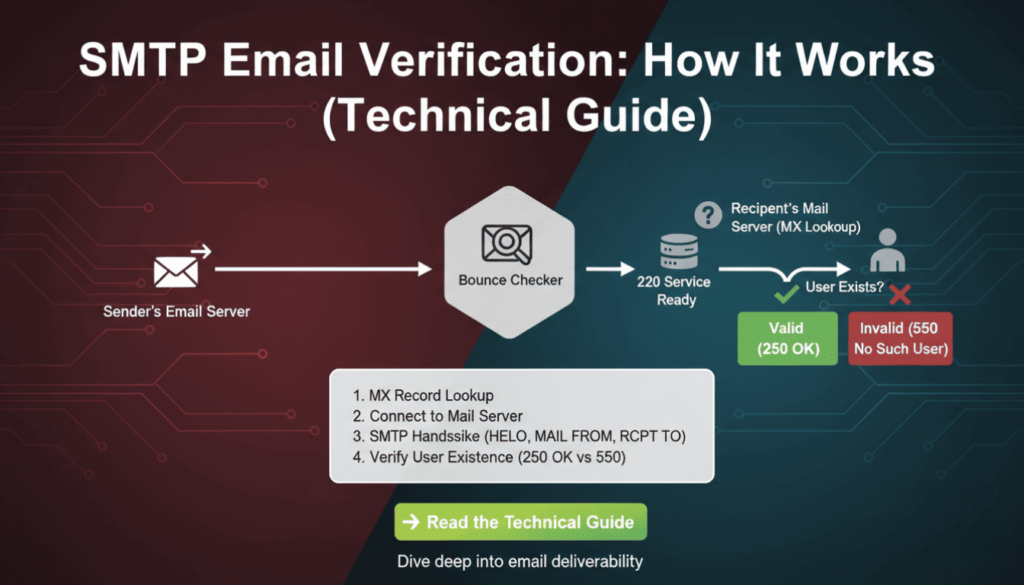
Email validation remains critical for maintaining clean contact lists and protecting sender reputation. However, syntax checks alone cannot confirm whether an email address actually exists. SMTP email verification solves this problem by connecting directly to mail servers and verifying recipient existence without sending actual messages. This technical guide explains the protocols, commands, and implementation strategies developers need to build reliable email verification systems.
What Is SMTP Email Verification
SMTP email verification uses the Simple Mail Transfer Protocol to check if an email address exists on a mail server. Unlike basic syntax validation, this method establishes a real connection to the recipient’s mail server and simulates the beginning of an email delivery process. The verification stops before actually sending data, making it a non-intrusive way to confirm address validity.
The process leverages standard SMTP commands that mail servers use for normal email delivery. By initiating a conversation with the target server and analyzing its responses, verification systems can determine whether the server recognizes the email address as valid. This approach provides significantly higher accuracy than regex patterns or DNS checks alone.
Mail servers respond with standardized codes that indicate acceptance, rejection, or temporary conditions. These responses allow verification systems to categorize addresses as deliverable, undeliverable, or uncertain. Therefore, smtp email verification serves as the most accurate pre-send validation method available to developers.
According to research by Return Path, approximately 20% of email addresses in marketing databases are invalid or abandoned. Implementing smtp email verification can identify these problematic addresses before they impact sender reputation or campaign metrics.
How SMTP Email Verification Works
The verification process follows the standard SMTP protocol but stops before transmitting message content. Understanding each step helps developers implement efficient verification systems and troubleshoot connection issues. The process involves DNS lookups, server connections, and command exchanges that mimic real email delivery.
The Three-Step SMTP Verification Process
First, the system extracts the domain from the email address and performs an MX (Mail Exchanger) record lookup. MX records identify which servers handle incoming mail for that domain. Multiple MX records may exist with different priority values, indicating primary and backup mail servers. The verification system typically targets the highest-priority server first.
Second, the system establishes a TCP connection to the mail server on port 25 (standard SMTP port). After connecting, it initiates an SMTP conversation using the HELO or EHLO command to identify itself. Modern servers prefer EHLO because it supports extended SMTP features, though HELO remains widely compatible.
Third, the system uses the MAIL FROM and RCPT TO commands to simulate sending an email to the target address. The server’s response to RCPT TO reveals whether it recognizes the recipient. A positive response indicates the address exists, while error codes suggest invalidity. Finally, the verification system sends QUIT to close the connection gracefully without delivering any message.
SMTP Commands Used in Email Verification
The EHLO command initiates the SMTP session and identifies the connecting client. For example, EHLO verification.example.com tells the server which domain is connecting. Servers respond with their capabilities and supported extensions, though verification systems typically only need basic SMTP functionality.
MAIL FROM specifies the sender address for the simulated message. The command looks like MAIL FROM:. Some mail servers perform sender verification or apply filtering rules at this stage, so choosing an appropriate FROM address matters for verification success rates.
RCPT TO provides the recipient address being verified. This command (RCPT TO:) generates the critical response that determines address validity. Servers return success codes for valid addresses and error codes for non-existent recipients, catch-all configurations, or policy rejections.
The QUIT command terminates the SMTP session cleanly. Proper connection closure prevents resource leaks and maintains good standing with mail servers. Moreover, abruptly closing connections without QUIT may trigger anti-abuse systems on some servers.
| Command | Purpose | Example |
|---|---|---|
| EHLO | Identify client and start session | EHLO verification.example.com |
| MAIL FROM | Specify sender address | MAIL FROM:<verify@example.com> |
| RCPT TO | Test recipient address | RCPT TO:<user@domain.com> |
| QUIT | Close connection | QUIT |
Technical Implementation of SMTP Verification
Implementing smtp email verification requires handling network connections, parsing server responses, and managing timeouts. Different programming languages offer various libraries that simplify SMTP interactions. However, understanding the underlying protocol helps developers debug issues and optimize performance.
Python Implementation Example
Python’s built-in libraries provide straightforward SMTP verification capabilities. The following example demonstrates a basic verification function using the smtplib and dns.resolver modules. This implementation includes timeout handling and error management for production reliability.
import smtplib
import dns.resolver

def verify_email_smtp(email):
    domain = email.split('@')[1]

    # Get MX records
    try:
        mx_records = dns.resolver.resolve(domain, 'MX')
        mx_host = str(mx_records[0].exchange)
    except:
        return {'valid': False, 'reason': 'No MX records'}

    # Connect to mail server
    try:
        server = smtplib.SMTP(timeout=10)
        server.connect(mx_host)
        server.helo('verification.example.com')
        server.mail('verify@example.com')
        code, message = server.rcpt(email)
        server.quit()

        return {'valid': code == 250, 'code': code, 'message': message}
    except Exception as e:
        return {'valid': False, 'reason': str(e)}
This code first extracts the domain and queries DNS for MX records. It then connects to the primary mail server with a 10-second timeout to prevent hanging on unresponsive servers. The RCPT command response code determines validity, with 250 indicating success. As a result, this function returns a structured response that applications can process programmatically.
Node.js Implementation Example
Node.js developers can use the net module for raw socket connections or specialized libraries like email-verify. The asynchronous nature of Node.js makes it well-suited for bulk verification tasks that process thousands of addresses concurrently. The following example uses promises for clean async handling.
const dns = require('dns').promises;
const net = require('net');

async function verifyEmailSMTP(email) {
    const domain = email.split('@')[1];

    // Resolve MX records
    const mxRecords = await dns.resolveMx(domain);
    const mxHost = mxRecords[0].exchange;

    return new Promise((resolve, reject) => {
        const client = net.createConnection(25, mxHost);
        let responses = '';

        client.on('data', (data) => {
            responses += data.toString();

            if (responses.includes('220')) {
                client.write('EHLO verification.example.com\r\n');
            } else if (responses.includes('250')) {
                if (!responses.includes('MAIL FROM')) {
                    client.write('MAIL FROM:\r\n');
                } else {
                    client.write(`RCPT TO:<${email}>\r\n`);
                }
            }

            if (responses.match(/^250.*RCPT/m)) {
                client.write('QUIT\r\n');
                resolve({valid: true, code: 250});
            }
        });

        client.setTimeout(10000);
        client.on('timeout', () => reject('Timeout'));
    });
}
This implementation uses raw socket connections for maximum control over the SMTP conversation. It accumulates server responses and sends appropriate commands based on received codes. The promise-based structure integrates cleanly with modern async/await patterns in Node.js applications.
PHP Implementation Example
PHP applications often handle email verification in web contexts where request timeouts matter. The following example uses PHP’s built-in socket functions to implement smtp email verification with appropriate timeout controls. This approach works without external dependencies.
function verifyEmailSMTP($email) {
    list($user, $domain) = explode('@', $email);

    // Get MX records
    getmxrr($domain, $mxhosts);
    if (empty($mxhosts)) {
        return ['valid' => false, 'reason' => 'No MX records'];
    }

    $mxHost = $mxhosts[0];
    $socket = fsockopen($mxHost, 25, $errno, $errstr, 10);

    if (!$socket) {
        return ['valid' => false, 'reason' => 'Connection failed'];
    }

    fgets($socket); // Read greeting
    fputs($socket, "EHLO verification.example.com\r\n");
    fgets($socket);

    fputs($socket, "MAIL FROM:\r\n");
    fgets($socket);

    fputs($socket, "RCPT TO:<$email>\r\n");
    $response = fgets($socket);

    fputs($socket, "QUIT\r\n");
    fclose($socket);

    $code = substr($response, 0, 3);
    return ['valid' => $code == '250', 'code' => $code];
}
This PHP function demonstrates the core verification logic in a procedural style familiar to many PHP developers. It handles the complete SMTP conversation and returns structured results. Furthermore, the 10-second timeout prevents long-running requests from impacting web server performance.
SMTP Response Codes Explained
Mail servers communicate using standardized three-digit response codes defined in RFC 5321. Understanding these codes enables accurate interpretation of verification results and appropriate error handling. Each code category indicates different types of outcomes that verification systems must handle differently.
Success Response Codes
Code 250 represents successful command execution and is the primary indicator of address validity. When a server returns 250 in response to RCPT TO, it confirms the mailbox exists and can receive messages. This response provides the highest confidence level for email verification systems.
Code 251 means “User not local; will forward to alternate path.” Some servers return this when they will relay the message to another system. For verification purposes, 251 should generally be treated as valid since the server accepts delivery responsibility.
Temporary Failure Codes
Codes in the 4xx range indicate temporary failures that may resolve with retry attempts. Code 450 means “Requested mail action not taken: mailbox unavailable.” This often occurs during server maintenance or when greylisting is active. Verification systems should mark these addresses as “unknown” rather than invalid.
Code 451 indicates “Requested action aborted: local error in processing.” Servers return this when experiencing temporary problems unrelated to the recipient address. As a result, these addresses warrant retry attempts after a delay before being classified as invalid.
Code 452 signals “Requested action not taken: insufficient system storage.” The recipient mailbox may be full or the server may have storage issues. While the address exists, delivery cannot currently succeed. Therefore, verification systems should flag these for manual review.
Permanent Failure Codes
Codes beginning with 5 represent permanent failures that indicate invalid addresses. Code 550 “Requested action not taken: mailbox unavailable” is the standard response for non-existent addresses. Verification systems should confidently mark these addresses as invalid.
Code 551 means “User not local; please try alternate path.” Unlike 251, this response suggests the server does not handle this recipient and provides no forwarding. Addresses receiving 551 should typically be classified as invalid for the queried server.
Code 553 indicates “Requested action not taken: mailbox name not allowed.” This occurs when the address violates server policies or naming conventions. These addresses are definitively invalid for that mail system.
| Code Range | Meaning | Verification Action |
|---|---|---|
| 250-251 | Success | Mark as valid |
| 450-452 | Temporary failure | Mark as unknown, retry later |
| 550-553 | Permanent failure | Mark as invalid |
According to data from Mailgun, approximately 15% of SMTP verification attempts receive temporary failure codes. Implementing appropriate retry logic for these cases improves overall verification accuracy by 8-12%.
Advantages of SMTP Email Verification
SMTP email verification provides significantly higher accuracy than alternative validation methods. While syntax validation catches obvious formatting errors and DNS checks confirm domain existence, only smtp email verification confirms that the specific mailbox exists and accepts mail. This precision reduces bounce rates by identifying problems before sending campaigns.
The method requires no specialized access or API keys to mail servers. Any system capable of making network connections can perform smtp email verification using standard protocols. This accessibility makes it practical for developers to implement without vendor dependencies or ongoing service costs.
Real-time verification happens quickly, typically completing in 1-3 seconds per address. This speed enables interactive validation during user registration or form submission. Moreover, the verification process leaves no trace in recipient inboxes because it never sends actual message content.
The verification process respects recipient privacy by not sending unwanted messages. Traditional verification methods that send confirmation emails create inbox clutter and negative user experiences. SMTP verification determines validity without generating any recipient-visible activity.
Integration with existing email systems remains straightforward because smtp email verification uses the same protocols as regular mail delivery. Developers familiar with SMTP for sending can easily adapt their knowledge to implement verification. Additionally, the same infrastructure that handles outbound mail can support verification traffic.
Research from Return Path indicates that maintaining list quality through smtp email verification improves sender reputation scores by an average of 23%. Consequently, verified lists achieve higher inbox placement rates and better overall campaign performance.
Limitations and Challenges
Despite its effectiveness, smtp email verification faces several technical and practical challenges. Understanding these limitations helps developers set appropriate expectations and implement complementary validation strategies. No single verification method achieves perfect accuracy across all scenarios.
Greylisting and Spam Protection
Many mail servers implement greylisting to combat spam. This technique temporarily rejects initial connection attempts from unknown senders, expecting legitimate servers to retry. Greylisting causes smtp email verification to receive 450-series temporary failure codes even for valid addresses. Verification systems must distinguish between true invalidity and greylisting delays.
Some servers employ aggressive anti-spam measures that reject verification attempts as suspicious activity. They may return error codes or drop connections when detecting SMTP sessions that disconnect without sending messages. As a result, verification systems need sophisticated retry logic and connection patterns that appear legitimate.
Rate limiting presents another challenge. Mail servers often restrict how many RCPT TO commands a connection can issue. Verification systems processing bulk lists may trigger these limits and receive temporary blocks. Therefore, implementing connection pooling and respecting server limits becomes essential for reliable operation.
Catch-All Servers
Catch-all mail servers accept messages for any address at their domain, regardless of whether specific mailboxes exist. These servers always return success codes during smtp email verification, making it impossible to determine if individual addresses are valid. According to industry estimates, approximately 10-15% of business domains use catch-all configurations.
Verification systems can detect catch-all servers by testing obviously invalid addresses at the domain. If random addresses like “thisaddressdoesnotexist123456@domain.com” receive success codes, the server likely uses catch-all routing. However, this detection method adds complexity and additional verification attempts.
Organizations using catch-all configurations often do so intentionally to prevent sender enumeration attacks. This security measure protects against malicious actors mapping out valid email addresses. Consequently, respecting these privacy protections sometimes means accepting uncertainty in verification results.
Rate Limiting Considerations
Bulk verification operations must respect rate limits to avoid being blocked by target mail servers. Most servers tolerate moderate verification traffic but will reject or throttle excessive connection attempts from the same source. Implementing delays between verification attempts prevents triggering abuse detection systems.
Distributed verification across multiple IP addresses and domains helps maintain acceptable request rates. Large-scale verification systems often rotate connection sources to spread load and avoid appearing as automated attacks. Nevertheless, this approach requires additional infrastructure and complexity.
Connection reuse improves efficiency but requires careful management. SMTP sessions can verify multiple addresses on the same domain within a single connection, reducing overhead. However, servers may impose per-session limits or become suspicious of sessions validating many recipients.
SMTP Verification vs Other Methods
Different validation approaches serve complementary purposes in comprehensive email verification systems. Understanding when to apply each method enables developers to build efficient multi-stage validation pipelines. Combining techniques provides better accuracy than relying on any single approach.
Syntax validation using regular expressions checks whether an email follows proper formatting rules. This method executes instantly with no network overhead but cannot confirm address existence. It serves best as a first-stage filter that catches obvious errors before more expensive validation steps.
DNS validation queries MX records to verify that a domain can receive email. This check runs faster than smtp email verification and consumes fewer resources. However, it only confirms domain-level configuration, not individual mailbox existence. DNS validation works well for detecting typos in domain names.
Disposable email detection identifies temporary addresses from services that provide short-lived inboxes. While not technically invalid, disposable addresses harm list quality and engagement rates. Specialized databases and pattern matching identify these addresses based on known provider domains and naming patterns.
Role-based address detection flags generic addresses like info@, support@, or admin@. These addresses typically route to teams rather than individuals and often achieve lower engagement in marketing contexts. Many organizations prefer excluding role-based addresses despite their technical validity.
API-based verification services combine multiple validation methods including smtp email verification in managed platforms. These services handle infrastructure complexity, rate limiting, and result caching. However, they introduce dependencies on third-party availability and typically charge per verification.
| Method | Speed | Accuracy | Resource Cost |
|---|---|---|---|
| Syntax Validation | Instant | 60-70% | Very Low |
| DNS Validation | Fast (100-300ms) | 75-85% | Low |
| SMTP Verification | Moderate (1-3s) | 95-98% | Moderate |
| API Services | Moderate (1-2s) | 96-99% | High (per use) |
Data from email deliverability research indicates that multi-stage validation reduces bounce rates by 85-92% compared to syntax validation alone. Organizations implementing comprehensive verification see sender reputation improvements within 30-60 days of list cleanup.
Best Practices for Implementation
Successful smtp email verification requires careful attention to implementation details and operational considerations. Following established best practices prevents common pitfalls and maximizes verification accuracy. These guidelines apply across different programming languages and deployment environments.
Connection Timeout Settings
Setting appropriate timeouts prevents verification systems from hanging on unresponsive servers. A 10-second timeout balances giving servers adequate response time against avoiding excessive delays. Shorter timeouts may cause false negatives with slow-responding legitimate servers, while longer timeouts waste resources on dead connections.
Different timeout values may apply to connection establishment versus command responses. Connection timeouts can be shorter (5 seconds) since network handshakes complete quickly. Command response timeouts should allow for server processing time, especially during high-load periods when mail servers may respond slowly.
Timeout handling should distinguish between complete failures and temporary issues. Addresses that consistently timeout may indicate DNS problems, firewall blocks, or abandoned domains. However, occasional timeouts during retry attempts suggest temporary network issues rather than invalid addresses.
Retry Logic and Error Handling
Implementing exponential backoff for retry attempts prevents overwhelming servers while giving temporary issues time to resolve. Initial retry after 1 minute, then 5 minutes, then 15 minutes provides reasonable intervals. Most temporary failures resolve within the first retry, making additional attempts unlikely to succeed.
Different error types warrant different retry strategies. Temporary failure codes (4xx) merit retry attempts, while permanent failures (5xx) should not be retried. Network errors like timeouts or connection refusals may indicate temporary issues worth retrying once or twice.
Logging detailed verification attempts aids troubleshooting and monitoring system health. Recording server responses, timing information, and any errors enables analysis of failure patterns. Moreover, comprehensive logs help identify problematic mail servers or network issues affecting verification accuracy.
Privacy and Compliance
SMTP verification must comply with anti-abuse regulations and respect mail server policies. Some jurisdictions regulate automated email system access, requiring transparency about verification purposes. Organizations should document their verification practices and maintain records of consent where applicable.
Identifying verification connections appropriately prevents being classified as malicious activity. Using proper domain names in EHLO commands and valid sender addresses in MAIL FROM improves server cooperation. Additionally, implementing proper SPF and reverse DNS records for verification source IPs demonstrates legitimacy.
Respecting rate limits and connection patterns maintains good relationships with mail providers. Excessive verification traffic may result in IP blacklisting or blocking that affects both verification and actual mail delivery. Therefore, implementing throttling and distributed verification protects sender reputation.
Data protection regulations like GDPR impose requirements on processing email addresses. Verification systems should minimize data retention and implement appropriate security controls. Furthermore, providing transparency about verification in privacy policies helps maintain user trust and regulatory compliance.
Frequently Asked Questions
Does SMTP email verification send actual emails to recipients?
No, smtp email verification never sends actual message content. The process establishes an SMTP connection and uses commands to check recipient validity, but disconnects before transmitting any email data. Recipients never receive messages or see verification attempts in their inboxes. This makes smtp email verification completely non-intrusive while still confirming address validity.
How accurate is SMTP verification compared to other validation methods?
SMTP verification achieves 95-98% accuracy according to email service provider research, significantly higher than syntax validation (60-70%) or DNS checks (75-85%). However, accuracy drops for domains using catch-all configurations or aggressive spam filtering. Combining smtp email verification with other validation methods in a multi-stage pipeline produces the best overall results.
Can SMTP verification detect disposable or temporary email addresses?
SMTP verification confirms whether an address exists and accepts mail, but cannot inherently identify disposable email services. Disposable addresses function as normal mailboxes from a technical perspective. Detecting these addresses requires additional checks against databases of known disposable email providers or pattern matching on suspicious domain names. Comprehensive verification systems combine SMTP checks with disposable email detection.
What should I do when SMTP verification returns temporary failure codes?
Temporary failure codes (4xx range) indicate the server cannot currently verify the address due to greylisting, rate limits, or transient issues. Mark these addresses as “unknown” rather than invalid and implement retry logic with exponential backoff. Most temporary failures resolve within minutes to hours. If an address consistently returns temporary failures after multiple retries, it may indicate deliverability issues worth flagging for review.
How can I verify emails at scale without getting blocked by mail servers?
Scale smtp email verification safely by implementing rate limiting, distributing requests across multiple IPs, and using connection pooling where possible. Respect server responses and back off when encountering rate limit errors. Consider using multiple verification source addresses and implementing delays between verification attempts. For very large lists, specialized email verification services provide infrastructure designed to handle bulk operations while maintaining good standing with mail providers.
SMTP email verification represents the most accurate method for confirming email address validity before sending campaigns. By understanding the technical protocols, implementing proper error handling, and following best practices, developers can build reliable verification systems that significantly reduce bounce rates and protect sender reputation. While challenges like greylisting and catch-all servers present limitations, smtp email verification remains essential for maintaining high-quality email lists.
For more information on email deliverability optimization, explore resources from Google Email Markup, RFC 5321 SMTP Specification, and Postmark’s Email Guides.
(Internal link suggestion: BounceChecker guide on reducing email bounce rates)
(Internal link suggestion: BounceChecker article on email list cleaning strategies)
